


An English lesson in 5 minutes. Your evening is back.
SpeakWell builds a lesson for your student's level and interests. You edit for five minutes and teach. Your students stay with you.
No card. Nothing to cancel.
- 500+tutors
- 2,000+students
- 5,000+lessons taught
Sound familiar?
- Sunday, 10:40 pm. Three coursebook tabs, a Google Doc, and you're hunting for an A2 text for a teenager who only cares about Minecraft.
- Forty-five minutes to prepare, fifty to teach. Multiply that by ten students a week. That's a second job nobody pays you for.
- The Present Perfect table is in a chat from last month, the vocabulary is in Notes, the homework is a PDF. A student asks, "Where's the thing we did?" and you spend longer looking for it than you did explaining it.
You became a tutor to teach. Instead, your evenings go to piecing lessons together.
Watch a lesson appear in a couple of minutes
Pick a student, a topic and a level. Click "Generate". The first tasks show up in 30 seconds, the full eight-section lesson in a couple of minutes: warm-up, vocabulary, reading, writing, grammar, practice, idioms, discussion. Five more minutes of editing and the lesson is ready to teach.
Three steps to a lesson ready to teach
Pick a student, a topic and a level
"Kate, 14, A2, loves K-pop, topic Present Perfect." That's enough.
Click "Generate", then edit
A couple of minutes later you have an eight-section lesson. Cut what you don't need, add your own, change the order. Mark what goes into homework.
Send it and teach it live
Your student opens the lesson on their device, and you talk on video right inside it. After class they do the homework, and the answers come back to you.
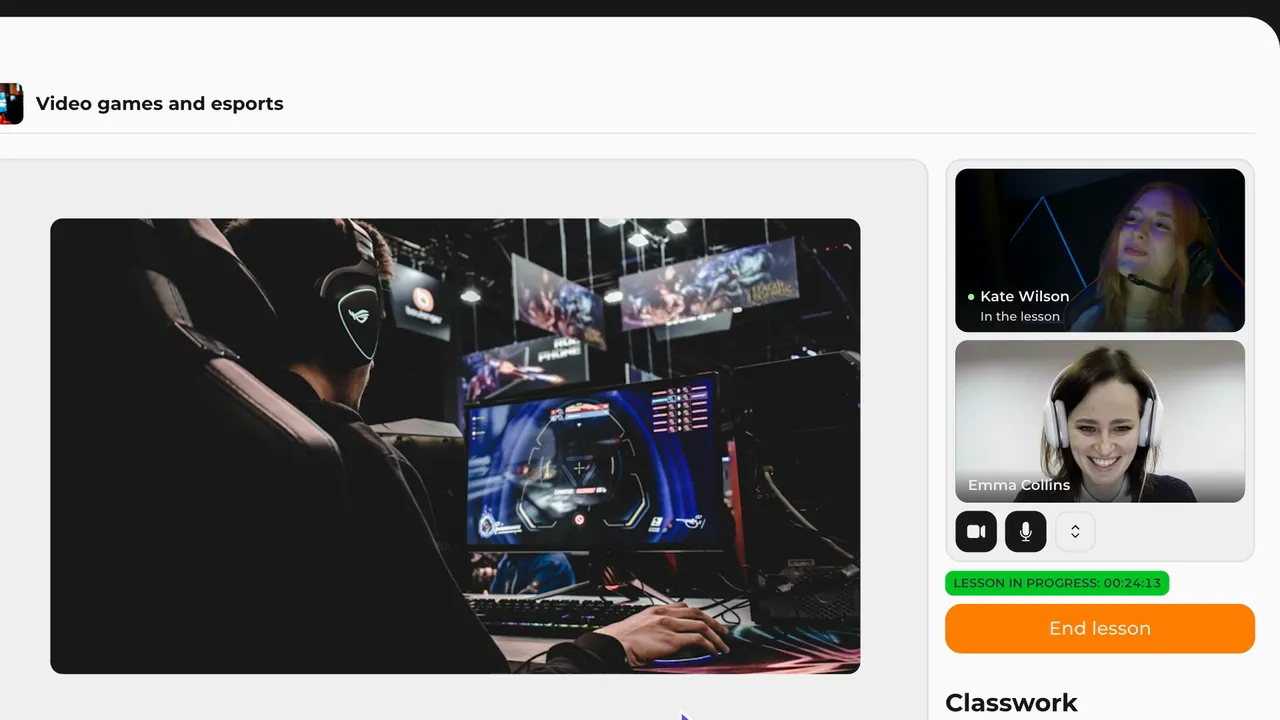
Lesson and call in one tab. You can close Zoom
Your student types an answer and it shows up on your screen while you're still talking. The call comes with every plan, even Free.
Connect in one tap
You start the lesson, your student taps "Accept", and you're in the same lesson. Camera and microphone turn on with one tap, right in the browser.
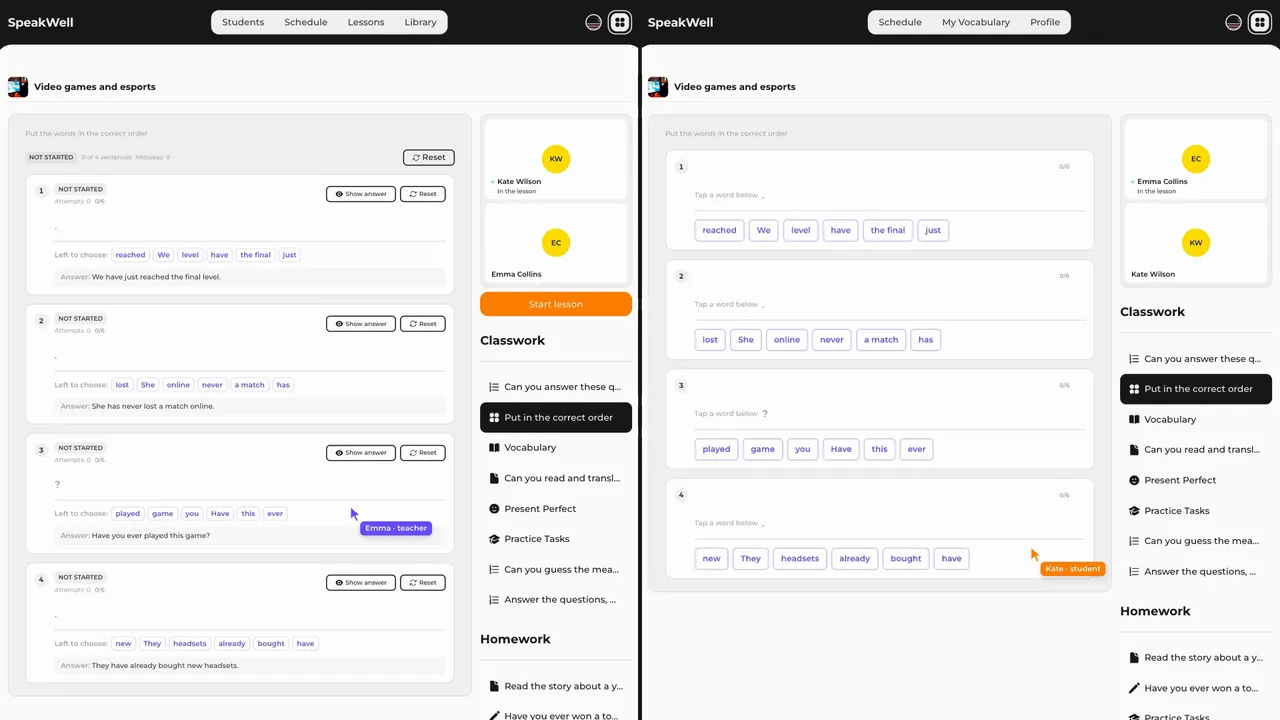
See how your student solves it
You spot a mistake while they're still typing and go over it right away, out loud. You see how far they've got in each task, and in texts with gaps, which words they tried.
Works on a phone too
The call shrinks into a small window over the lesson, so the task stays in view. Move the window to a corner or tuck it behind the screen edge.
Your students stay with you
Every student gets their own space, and everything in it points back to you: lessons, words, homework, progress. They learn from you, not from a coursebook.
Live lesson
You and your student in one lesson at the same time. You add a task and it's on their screen. They answer and you see it. No screen sharing.
Free for studentsYour students pay nothing. You pay one flat price for your plan.
All of your teaching in one tab
Lessons, calls, words, schedule, students. Nothing gets lost in chats and folders.
Library
Save the sections and lessons that worked. Assign them to any student in one click, and each student gets their own copy. Build once, use for years.
Schedule
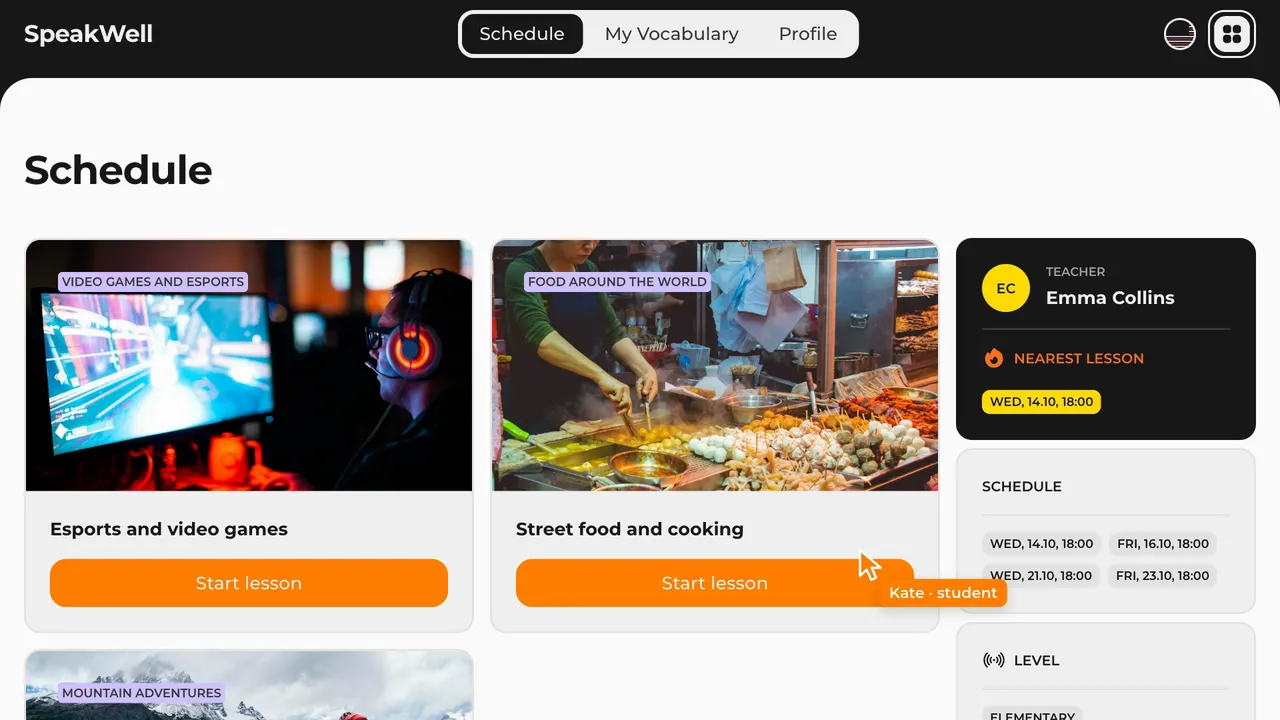
Recurring weekly classes, reschedules, cancellations, time zones. The whole week at a glance, no forgotten classes.
Invitations
Send your student a link. They sign up and appear in your list right away. Nothing for them to install.
17 section types
Reading and listening
- Reading
- Listening
- Warm-ups and discussion
Words and grammar
- Vocabulary
- Grammar
- Practice
- Writing
Text puzzles
- Text cut into pieces
- Text without spaces
- Text with gaps
Media
- YouTube
- Images
- Files
Interactive tasks
- Matching words with pictures
- Matching texts with texts
- Sorting into groups
- Words in the correct order
Put them together in any order.
A lesson for this student, not for "the average learner"
Interests and level shape everything
A football text for B1 and a football text for A2 are two different texts: different vocabulary, different sentence length, different tasks.
Football is a popular game. Two teams play with one ball and try to score a goal.
- words
- 17
- words per sentence
- 9
Football is played by two teams of eleven players, who try to score by getting the ball into the opponent's net. A match lasts ninety minutes, and the team with more goals wins.
- words
- 33
- words per sentence
- 17
15 reading genres
Mystery, fantasy, biography, comedy, science fiction. A teenager finishes the mystery, an adult picks the article.
Tasks are checked before you ever see them
Every set of 15 tasks goes through automatic checks and is solved independently by a separate AI. Wrong answer keys, double negatives and hints in the prompt are filtered out before they reach you.
Vocabulary words go into the reading
The AI puts the words your student is learning right now into the text and sets them in bold, so they meet them in real context. What they have already covered doesn't come back.
Everything is editable
Any sentence, any task. Your teaching method stays your own.
What tutors say
The quality of the generated lessons impresses me.
Creating and preparing lessons got faster, and now I have more time for my own things.
I like that the team always listens to feedback and keeps improving the platform. That's worth a lot.
Do the maths
- Before
- 45minutes to prepare one lesson
- After
- 5minutes
- Difference
- 40minutes per lesson
At ten lessons a week, that's 5+ hours. Almost a full working day, back in your hands.
Start free. One flat price a month when you need more.
Free
€0a month
16 AI generations a month
Up to 3 active students
For a few students and lessons you mostly build yourself.
Pro
€9.99a month
150 AI generations a month
Up to 10 active students
For tutors who generate whole lessons.
Max
€19.99a month
500 AI generations a month
Any number of active students
For a full schedule with a lesson for every slot.
You pay for the plan, never for each student. Students pay nothing.
14 days of PRO free, no card needed.
FAQ
Is there a free plan?
Yes. Free gives you up to 3 active students, up to 16 AI generations a month and 100 MB for files and audio, with no time limit. Every account also starts with 14 days of full Pro, no card needed.
What happens after the trial if I don't add a card?
You move to Free. Lessons, students, files and the library stay where they are; nothing is deleted. If you have more students than Free allows, you choose who stays active and the rest are paused. Add a card whenever you want Pro or Max.
Does the price depend on how many students I have?
No. You pay one flat price a month for your plan. Each plan includes active students: up to 3 on Free, up to 10 on Pro, no limit on Max. Students pay nothing.
What is a generation and how many do I need?
One generation is one section. A full eight-section lesson is eight generations. Free gives you up to 16 a month, Pro about 18 full lessons a month, Max about 62. On Pro you can buy 50 more for €4.99, and the unused ones carry over to the next month.
Which students does this work for?
Schoolchildren from age 10, university students, adults. Five levels from elementary to advanced. You set the topic, genre and interests for each student. For exam prep you assemble the sections you need: grammar, writing, practice.
What about my own materials?
Paste your own texts into a text section, build your own grammar tables in the editor, add YouTube videos and images by link. Use AI where you want it, or don't use it at all.
Do students need to install anything?
No. They open the lesson from a link in the browser, on a phone or a laptop. To build lessons, you'll want a laptop.
Do I need Zoom or Google Meet?
No. The video call is built into the lesson. You click "Start lesson", your student accepts the invitation, you both turn on the camera and microphone, and you see and hear each other on the same page. The call comes with every plan, Free included, and runs in the browser on a laptop or a phone.
Who can see my lessons?
Only you and the students you've sent them to. Your library and student data are closed to everyone else.
Build your next lesson in 5 minutes
Add a student, pick a topic, click "Generate". In a couple of minutes you'll see a lesson that used to take your whole evening.
14 days of full Pro. No card.